I have run six tiling window managers on macOS: yabai with skhd, AeroSpace, rift, OmniWM, Spaceman, and dinky. dinky is the one I use today. It feels like a part of macOS that was missing.
The short version is a tier list on X (opens in a new tab) (відкриється в новій вкладці). This is the long one: where each tool sits, and the engineering decision that put it there.
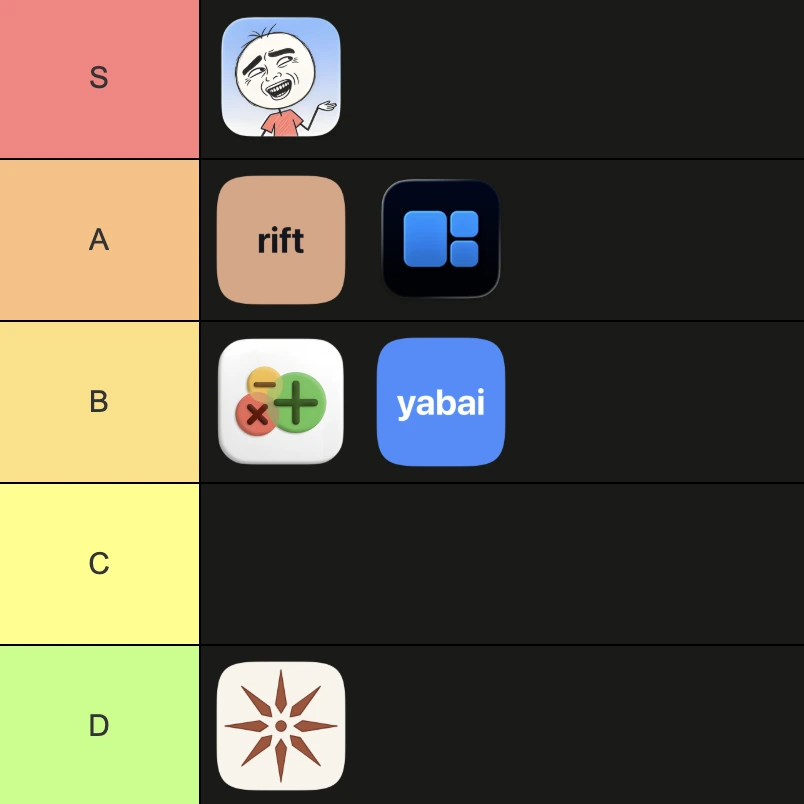
The ranking
| Tier | Tool | Why it sits there |
|---|---|---|
| S | dinky | Tiles real macOS Spaces, switches them fast, and leaves SIP on |
| A | rift | Fast and capable, with the widest layout choice of the virtual-workspace set |
| A | Spaceman | The shortcut model I like most, with careful handling of edge cases |
| B | AeroSpace | Made virtual workspaces popular. Newer tools have built on its idea |
| B | yabai with skhd | The original power tool. Its best features still ask you to weaken SIP |
| D | OmniWM | Capable, but it tries to be an entire desktop shell |
This ranks daily drivers, not importance. yabai and AeroSpace paved the way for everything above them, and dinky's credits list both by name.
One question sorts all six
When a workspace is not on screen, where do its windows go?
macOS has its own answer, Spaces, but no public way to control them. AeroSpace's guide says it plainly: "Apple doesn't provide public API to communicate with Spaces." (opens in a new tab) (відкриється в новій вкладці) Every tool here is a way around that sentence.
A hidden workspace either lives on a real macOS Space or is parked off screen. Real Spaces are reached by injecting code into the Dock, as yabai does, or by sending the Dock a synthetic swipe, as dinky does. AeroSpace, rift, Spaceman, and OmniWM park windows off screen.
Use plus and minus to zoom, arrow keys to move around the diagram when zoomed, and Home to reset.
Parking is a trick with a visible seam. macOS refuses to move a window fully off screen, so every hidden window keeps a one-pixel sliver at a bottom corner of your display. Switching workspaces shuffles windows in and out of that corner. It is instant, because all it asks of macOS is a move. But as far as macOS knows, everything still lives on one desktop. Mission Control shows every window from every workspace at once, and a window manager that crashes leaves its windows stranded off screen.
A real Space has no seam. The windows are on another desktop, nothing waits in a corner, and Mission Control and Cmd-Tab agree with you about where things are. The catch is that Spaces belong to the Dock, so you either get inside the Dock or persuade it.
Each branch has its own price:
| Tool | Workspaces | SIP | Private APIs | Language | First release | Stars |
|---|---|---|---|---|---|---|
| yabai | Native Spaces | Partly off for Space control | SkyLight, plus code injected into Dock | C, Objective-C | June 2019 | 29,862 |
| AeroSpace | Virtual | On | One symbol | Swift | October 2023 | 23,955 |
| rift | Virtual | On | About 60 SkyLight symbols | Rust | October 2025 | 2,767 |
| OmniWM | Virtual | On | SkyLight | Swift | December 2025 | 3,720 |
| Spaceman | Virtual | On | One symbol | Rust | August 2026 | 536 |
| dinky | Native Spaces | On | SkyLight, plus a synthetic Dock swipe | Swift | September 2026 | 159 |
The one symbol is _AXUIElementGetWindow, which maps an Accessibility element
to a window ID. Everything else AeroSpace and Spaceman do goes through the public
Accessibility API.
yabai and skhd: reaching into the Dock
yabai is the oldest tool here, first released as v1.0.0 in June 2019 (opens in a new tab) (відкриється в новій вкладці). I ran it with skhd for hotkeys and with System Integrity Protection partly disabled.
It wants SIP off for a specific reason. The author's write-up on the issue tracker (opens in a new tab) (відкриється в новій вкладці) puts it in one line: "The entire spaces system in macOS is implemented in Dock.app." The Dock's connection to the WindowServer has elevated privileges, so yabai loads a scripting addition into the Dock process to borrow them. The injection lives in memory and changes no file on disk.
That addition unlocks the features in the SIP section of the wiki (opens in a new tab) (відкриється в новій вкладці): moving, creating, and destroying Spaces, window transparency and animations, sticky windows, and more. On Apple silicon the price is filesystem protections, debugging restrictions, and NVRAM protection turned off, plus a boot argument.
yabai runs fine with SIP on if you skip those features, but they are the reason to pick yabai. I ran it with SIP relaxed, and there is no way that does not bother you at least a little. That is why it is in B.
skhd is a small hotkey daemon with a one-line-per-binding config, a natural fit for yabai's CLI-only design. Its README now says the repository is in maintenance mode.
AeroSpace: do not use Spaces at all
AeroSpace took the opposite route in 2023. It ignores native Spaces and emulates its own (opens in a new tab) (відкриється в новій вкладці): "if the workspace isn't active then all of its windows are placed outside the visible area of the screen, in the bottom right or left corner."
macOS will not let a window leave the screen completely, and the guide admits the artifact: "You will still be able to see a 1 pixel vertical line of 'hidden' windows." In exchange, switching is instant, there is no 16-Space limit, and the README (opens in a new tab) (відкриється в новій вкладці) can promise that "AeroSpace will never require you to disable SIP."
The guide even recommends turning "Displays have separate Spaces" off: "Spaces are just cursed in macOS. The less Spaces you have, the better macOS behaves." yabai requires the same setting on.
AeroSpace also brought an i3-style tree, a TOML config, and a CLI-first design with a documented socket protocol. Its influence shows: rift and Spaceman park windows at a bottom corner the same way, and dinky follows AeroSpace's query commands so bar scripts keep working. It is good, it is still in public beta after three years, and I think it could be better. For me that is B.
rift: private APIs on purpose
rift is written in Rust. It keeps the virtual-workspace model and drops the
restraint about private APIs. Its
manifesto (opens in a new tab) (відкриється в новій вкладці)
calls them "far more stable and reliable than the public (accessibility) api",
and
skylight.rs (opens in a new tab) (відкриється в новій вкладці)
declares about 60 SkyLight symbols. SIP stays on. On native Spaces the manifesto
is blunt: "this is impossible without disabling sip." dinky later found a way
around that.
rift has the widest layout choice of the virtual-workspace tools: traditional, BSP, stack, master-stack, scrolling, and floating, each selectable per workspace. It also has a menu bar indicator, gestures, and hot reload.
It plans for its own crash, too. A window manager that parks windows off screen strands them if it dies, so rift runs a separate recovery process (opens in a new tab) (відкриється в новій вкладці). The source comment gives the reason: "neither destructors nor signal handlers run after SIGKILL."
rift is great. Its roadmap still calls it beta, and for me it is not quite there yet.
Spaceman: a tile is not a window
Spaceman comes from Anomaly, the team behind OpenCode. They have given us some cool software lately, Hex and Rune included.
It starts from a bug you only meet with native tabs. The project's plan (opens in a new tab) (відкриється в новій вкладці) describes it: selecting a Ghostty tab "exposes a different Accessibility window identity even though the user still sees one terminal window." A window manager that treats each identity as a tile can split your terminal in half.
Spaceman separates the two ideas. A logical slot "owns one place in the layout,
while its current physical AXWindow binding is replaceable." When a tab switch
swaps the underlying window, the slot keeps its place, size, and workspace.
It parks windows like AeroSpace does, with more care. Per the
workspace notes (opens in a new tab) (відкриється в новій вкладці),
the original frame is written to parked-windows.json before a window moves. A
switch reveals the incoming windows first and parks the outgoing ones after, so
the bare desktop never flashes, and it rolls back if the window server does not
confirm the reveal within 300 ms. On the development branch, a window that
un-parks itself twice in five minutes becomes
parking-exempt (opens in a new tab) (відкриється в новій вкладці)
for the session and stays visible.
I adopted Spaceman's shortcut design everywhere: one base modifier, and every move action is the same chord plus Shift.
Two things keep it in A. It is fast, yet still feels slightly less native than real Spaces. And it has no accordion layout, a mode I think is great. When Spaceman adds one, it becomes my first choice after dinky. It is already where I would switch if Apple breaks dinky somehow.
OmniWM: the everything app
OmniWM is in D, and it is not a bad program. It has an active community, and its developer docs (opens in a new tab) (відкриється в новій вкладці) describe a serious architecture: one commit path for all state, and layout plans that are dropped when they go stale.
My problem is scope. The README (opens in a new tab) (відкриється в новій вкладці) lists fourteen highlights, and tiling is two of them. The rest include a window switcher, a Quake-style terminal powered by Ghostty, app theming, a command palette, menu bar icon hiding "similar to Ice", a keep-awake feature "similar to Caffeine", and an interactive workspace bar. The docs add clipboard history, a Dynamic Island, and a scriptable desktop shell with 29 default widgets.
I already have a launcher and a terminal that I chose on purpose. I want my window manager to move rectangles. OmniWM suits someone who wants one app to own the whole desktop. That is not me, so I uninstalled it.
dinky: real Spaces, SIP on
dinky does what rift's manifesto called impossible. It tiles windows on native Spaces, switches between them quickly, and injects nothing into the Dock (opens in a new tab) (відкриється в новій вкладці).
The trick is that dinky hands the Dock an input event. It posts a synthetic Dock swipe, the event a trackpad swipe between Spaces produces. On macOS 27 the swipe carries a velocity high enough that the Dock skips the slide animation. The site puts the result at "about 70 ms instead of half a second."
That number traces back to the author's measurement notes (opens in a new tab) (відкриється в новій вкладці): a median of 66 ms for the swipe against 558 ms for a synthetic Control-Arrow, in a virtual machine, measured to the moment the system reports the new Space. A later run on real hardware with SIP on and two displays logged 93 to 176 ms across ten switches. On my Mac, switching by hotkey feels instant.
The source comments explain the tuning. On older macOS versions the swipe
velocity is pinned to 50, and
the reason is written down (opens in a new tab) (відкриється в новій вкладці):
"At 200 or more macOS skips the animation and never tells the windows of the
Space it lands on that they are visible again, so apps that stop drawing while
hidden, like Ghostty, stay blank." dinky also tags its own synthetic events with
the bytes 0x44494E4B, "DINK" in ASCII, so it never mistakes them for your
swipes.
Moving a window between Spaces is the other half. Apple's SkyLight framework does not export the function dinky needs, so dinky walks the framework's symbol table at runtime (opens in a new tab) (відкриється в новій вкладці) to find it. On macOS 27 it also creates and removes Spaces to match your workspace count. On macOS 26 it refuses to, after an issue (opens in a new tab) (відкриється в новій вкладці) where the Dock was left with a phantom desktop.
In daily use that earns the S:
- Mission Control, the Dock, and Cmd-Tab all see the same workspaces I do.
- Nothing is parked off screen, so there is no sliver at the corner and nothing to strand after a crash.
- It has an accordion mode, a scrolling layout, and a master layout.
- Small things are right: window animations and a proper Dark Mode app icon.
The author is upfront about the state of it: "early, in daily use by its author on macOS 27. Expect rough edges." I see an occasional flicker on a Space switch, which I suspect is macOS redrawing the desktop. Cmd-Tab to an app on another Space is slower than a direct hotkey, because macOS activates the app first and dinky follows. There is no gapless fullscreen. And the whole design rests on private calls. The site says so: "A macOS update can break them."
I accept that trade. dinky is two months old and has shipped 33 releases in 59 days.
An honorable mention: FlashSpace
FlashSpace (opens in a new tab) (відкриється в новій вкладці) is not on the tier list because it is not a window manager. Its README calls it a "virtual workspace manager", and it answers the hiding question a fourth way: it hides the apps. You assign apps to workspaces, and a switch shows those and hides the rest with the hide macOS already has, the one behind Cmd-H.
The trade-off is in the README under its own heading, "No Support For Individual App Windows Per Workspace". Hiding works on a whole app, so all of its windows go together. The reason given is "the lack of a public API in macOS to hide specific windows." In return nothing is parked in a corner, and the README can call the approach "hack-free" and say it "doesn't break other features in the system like Mission Control."
FlashSpace was my default for a long time, and I still think it is great. Since I am handing out grades: I have contributed to both FlashSpace and rift.
Where this leaves me
dinky is my daily driver. rift and Spaceman stay installed, and AeroSpace and yabai keep my respect and a place in the config repository.
All four configs share one keymap, so switching tools costs one app launch. That is my insurance against the private-API risk: if a macOS update breaks dinky, Spaceman is one click away with nothing to relearn.
The caveat is time. Two of these six tools did not exist four months ago, and dinky is two months old. I will see which one still feels right after a few macOS updates.
Sources
- dinky documentation (opens in a new tab) (відкриється в новій вкладці)
- dinky source (opens in a new tab) (відкриється в новій вкладці)
- dinky: measurement notes (opens in a new tab) (відкриється в новій вкладці)
- Spaceman source (opens in a new tab) (відкриється в новій вкладці)
- Spaceman: plan and logical slots (opens in a new tab) (відкриється в новій вкладці)
- rift source (opens in a new tab) (відкриється в новій вкладці)
- rift: manifesto (opens in a new tab) (відкриється в новій вкладці)
- AeroSpace guide (opens in a new tab) (відкриється в новій вкладці)
- AeroSpace source (opens in a new tab) (відкриється в новій вкладці)
- yabai source (opens in a new tab) (відкриється в новій вкладці)
- yabai: disabling System Integrity Protection (opens in a new tab) (відкриється в новій вкладці)
- yabai: how the scripting addition works (opens in a new tab) (відкриється в новій вкладці)
- skhd source (opens in a new tab) (відкриється в новій вкладці)
- OmniWM source (opens in a new tab) (відкриється в новій вкладці)
- FlashSpace source (opens in a new tab) (відкриється в новій вкладці)